What Is Smart Home Manager? Complete Guide to AT&T’s Home WiFi App (2026)
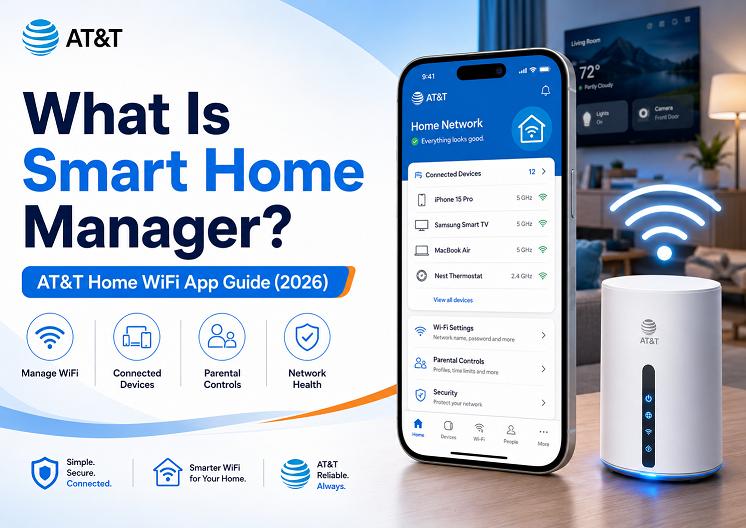
AT&T Smart Home Manager is the free home WiFi management app for AT&T Internet customers. It lets you see what devices are connected to your home network, change your WiFi name and password, run speed tests, restart your gateway, check network health, set up parental controls, create family profiles, pause WiFi, and schedule downtime for kids’ devices. In 2026, it works as AT&T’s main router app for managing your home WiFi from a phone instead of logging into a confusing gateway admin page.
If you have AT&T Internet or AT&T Fiber at home, the Smart Home Manager app is one of the most useful tools you may not be using yet. Instead of calling support every time your WiFi slows down, a device looks unfamiliar, or your child needs screen-time limits, Smart Home Manager gives you a simple dashboard for your home network.
For US households in 2026, this type of home WiFi app matters more than ever. Most families now have phones, tablets, laptops, smart TVs, security cameras, smart speakers, thermostats, gaming consoles, and work-from-home devices all connected to the same router. Without a good router app, it becomes difficult to know what is connected, which device is using WiFi, whether your internet is actually slow, and how to pause access when needed.
This guide explains exactly what AT&T Smart Home Manager does, how to use it, what features require a compatible AT&T Wi-Fi Gateway or All-Fi Hub, how it compares with Xfinity xFi, and how to fix common problems like the app not showing devices or Smart Home Manager not working.
What Is Smart Home Manager?
Smart Home Manager is AT&T’s official app for managing your home WiFi network. It gives AT&T Internet customers a cleaner way to control the WiFi gateway, connected devices, parental controls, speed tests, and troubleshooting tools from one place.
Think of it as the control panel for your AT&T home internet. In the past, many people had to type a gateway IP address into a browser, log into a router page, and search through technical settings. Smart Home Manager makes those same everyday tasks much easier by putting them into a mobile app.
With Smart Home Manager, you can usually:
- View devices connected to your AT&T WiFi network
- Rename devices so they are easier to recognize
- Change your WiFi network name and password
- Run an internet speed test to your Wi-Fi Gateway
- Check network health and service outage alerts
- Restart your AT&T gateway from the app
- Create profiles for family members
- Set parental controls and downtime schedules
- Pause WiFi access for selected devices or profiles
- Find weak WiFi signal areas in your home
- Get troubleshooting help and recommendations
Important Difference
Smart Home Manager is not the same as the myAT&T billing app. The myAT&T app is mainly for your account, bill, plan, and support. Smart Home Manager is focused on your home WiFi network, connected devices, gateway, speed tests, and parental controls.
Who Can Use the AT&T Smart Home Manager App?
Smart Home Manager is designed for AT&T Internet customers with a compatible AT&T Wi-Fi Gateway or AT&T All-Fi Hub. That includes many AT&T Fiber and AT&T Internet Air customers, but feature availability can vary depending on your equipment, service type, and account setup.
| User Type | Can Use Smart Home Manager? | What to Expect |
|---|---|---|
| AT&T Fiber customer with compatible gateway | Yes | Usually gets the best experience, including device list, WiFi settings, speed tests, gateway tools, and parental controls. |
| AT&T Internet Air customer with All-Fi Hub | Yes | Can manage many home network features through the app, depending on account and equipment compatibility. |
| Older AT&T Internet customer | Sometimes | Some features may be limited if your gateway is old or not fully supported. |
| Customer using own router behind AT&T gateway | Limited | Smart Home Manager may not see every device correctly if another router is handling your network. |
| Non-AT&T Internet customer | No | This app is for AT&T Internet customers, not for Comcast Xfinity, Spectrum, Verizon Fios, or other providers. |
If you are comparing ISP router apps, Smart Home Manager is AT&T’s version of tools like Xfinity xFi. Both apps help customers manage home WiFi, connected devices, parental controls, speed testing, and network troubleshooting.
How to Download and Log In to Smart Home Manager
Setting up the AT&T Smart Home Manager app is simple if your AT&T account and gateway are already active.
Download the Smart Home Manager App
Search for “Smart Home Manager” in the Apple App Store or Google Play Store. Make sure the app is published by AT&T Services, Inc. Avoid unofficial apps or third-party WiFi tools that use similar names.
Sign In With Your AT&T User ID
Use the same AT&T login connected to your home internet account. If you manage more than one AT&T service, make sure you choose the correct home internet account after signing in.
Let the App Detect Your Gateway
Once signed in, Smart Home Manager should detect your AT&T Wi-Fi Gateway or All-Fi Hub. The app may take a minute to load your network name, connected devices, and gateway status.
Check the Network Dashboard
From the main dashboard, look for connected devices, network health, WiFi settings, speed test, and troubleshooting tools. If the app shows limited information, your gateway may be offline, unsupported, or connected behind another router.
The 8 Main Features of Smart Home Manager
The biggest benefit of Smart Home Manager is that it brings common router and WiFi tasks into one easy app. These are the features most AT&T Internet customers should know.
Smart Home Manager can show devices connected to your AT&T WiFi network. This may include phones, laptops, smart TVs, tablets, game consoles, cameras, printers, smart speakers, and other smart home devices.
Many devices appear with confusing names like “Android-1234” or “ESP_Device.” Smart Home Manager lets you rename devices and assign them to profiles, so your network becomes easier to understand.
You can view, update, and share your WiFi network name and password directly in the app. This is helpful when guests ask for the WiFi password or when you want to change an old password for better home network security.
The built-in speed test checks the internet speed to your Wi-Fi Gateway. This helps you understand whether the issue is your AT&T internet connection, your WiFi signal, or a specific device.
Smart Home Manager lets you create family profiles, assign devices, set content controls on supported gateways, pause internet access, and create downtime schedules for screen-time management.
You can pause WiFi access for selected devices or profiles. This does not delete the device from your network, but it temporarily stops internet access through your home WiFi.
Smart Home Manager can show network health, service issue notifications, outage alerts, and troubleshooting recommendations. This makes it useful when your internet is slow, your WiFi drops, or your gateway needs attention.
If your AT&T internet is acting slow or unstable, Smart Home Manager can restart your Wi-Fi Gateway from the app. This is easier than unplugging the gateway manually.
How to See Connected Devices on AT&T WiFi
One of the most searched Smart Home Manager questions is how to see all devices connected to AT&T WiFi. This is important because unknown devices can slow down your network, create security concerns, or make parental controls harder to manage.
Open Smart Home Manager
Open the app and sign in with your AT&T user ID connected to your home internet account.
Go to Your Network or Devices Section
Look for a section showing connected devices, home network, or device list. The exact wording may change depending on the app version.
Review Online and Offline Devices
Check which devices are currently connected and which ones were previously connected. Rename devices you recognize so they are easier to identify later.
Pause Unknown Devices
If you see a device you do not recognize, pause it first instead of deleting anything. Then check whether a family member’s phone, TV, camera, or smart plug stopped working.
For a complete step-by-step guide on pausing, removing, and managing devices, see our detailed tutorial: How to Remove Devices from AT&T Smart Home Manager.
Why Unknown Devices Appear
Not every unknown device is a hacker. Many smart home devices, phones with private WiFi addresses, printers, streaming sticks, and IoT gadgets show generic names. Rename known devices one by one before assuming someone has broken into your network.
How to Change Your AT&T WiFi Name and Password
Changing your WiFi name and password is one of the best ways to clean up your home network, remove old guest access, and improve security. Smart Home Manager makes this easier than logging into the gateway manually.
- Open the Smart Home Manager app.
- Sign in with your AT&T user ID.
- Go to your WiFi or network settings.
- Select your WiFi network name.
- Edit the WiFi name or password.
- Save the changes.
- Reconnect your phones, TVs, cameras, laptops, and smart home devices using the new password.
Security Tip for 2026
Use a strong WiFi password that is not reused on other accounts. Avoid simple passwords like your phone number, street name, family name, or “password123.” For smart home security, it is also smart to review connected devices regularly and remove or pause anything you do not recognize.
If your main concern is protecting cameras, smart locks, speakers, plugs, and other devices, also read: How to Secure Your Smart Home Against Hacking.
How to Set Up Parental Controls and Downtime
Smart Home Manager is especially useful for parents because it can group devices by person and create WiFi schedules. This makes it a practical WiFi parental control app for families that already use AT&T Internet.
Create a Profile
Open Smart Home Manager and create a profile for each child, adult, or group of shared devices. For example: “Aiden,” “Kids,” “Guest Devices,” or “Gaming Consoles.”
Add Devices to the Profile
Assign each phone, tablet, laptop, gaming console, or smart TV to the correct profile. This lets you manage multiple devices with one action.
Set Content Controls
On supported AT&T gateways and All-Fi Hubs, Smart Home Manager can provide content controls. These are useful as a basic layer of family internet safety, but they should not replace conversations, device-level controls, and app-level restrictions.
Create Downtime Schedules
Set scheduled internet pauses for bedtime, school nights, homework, dinner, or family time. When downtime starts, WiFi access pauses for the devices assigned to that profile.
Use Pause WiFi for Quick Control
If you do not need a full schedule, you can manually pause a device or profile. This is useful when a child keeps using a gaming console, tablet, or streaming device after the agreed time.
Parental Control Limitation
Smart Home Manager controls your home WiFi network. If a phone switches to cellular data or connects to another WiFi network, Smart Home Manager cannot control that outside connection.
Smart Home Manager vs Xfinity xFi
AT&T Smart Home Manager and Xfinity xFi are similar because both are ISP router apps. They are built for customers who want to manage home WiFi without opening a complicated router admin page.
| Feature | AT&T Smart Home Manager | Xfinity xFi |
|---|---|---|
| Provider | AT&T Internet / AT&T Fiber | Comcast Xfinity Internet |
| Connected device list | Yes, with compatible gateway | Yes, with Xfinity Gateway |
| WiFi name/password changes | Yes | Yes |
| Speed test | Yes, gateway speed test | Yes |
| Parental controls | Profiles, content controls, pause, downtime | Profiles, pause, schedules, parental tools |
| Security tools | May include AT&T ActiveArmor internet security depending on eligibility | xFi Advanced Security with compatible gateway |
| Best for | AT&T customers who want simple WiFi and family controls | Xfinity customers who want app-based WiFi and security controls |
Neither app is “better” for everyone because you can only use the app that matches your internet provider. If you have AT&T Internet, Smart Home Manager is the app to use. If you have Comcast Xfinity, read our full guide: What Is Xfinity xFi?.
We are also preparing a full router app comparison hub here: AT&T vs Xfinity vs Spectrum vs Verizon Fios Router Apps.
Smart Home Manager Not Working: Common Problems and Fixes
Like any home internet app, Smart Home Manager can sometimes fail to load, show outdated device information, or miss connected devices. Here are the most common problems and what to try first.
| Problem | Likely Cause | Fix |
|---|---|---|
| Smart Home Manager not showing devices | App needs refresh, device uses private address, gateway issue, or third-party router setup | Refresh the app, restart the gateway, confirm the device is on your AT&T WiFi, and rename devices you recognize. |
| App says gateway is offline | Gateway is rebooting, disconnected, or service issue exists | Check gateway lights, wait several minutes after a restart, and check for outage alerts in the app. |
| Parental controls not working | Device not assigned to correct profile, unsupported equipment, or device switched to cellular data | Check the profile, confirm the device is connected to home WiFi, and review content control eligibility. |
| Downtime schedule not saving | App bug, profile issue, outdated app, or account sync problem | Update the app, delete and recreate the schedule, restart the gateway, or sign out and sign back in. |
| Speed test looks slow | WiFi interference, weak signal, too many devices, or plan limitation | Run the test near the gateway, restart the gateway, check weak signal spots, and compare wired vs WiFi performance if possible. |
| Cannot change WiFi password | Permission issue, gateway compatibility, or app sync delay | Confirm you are using the primary AT&T account login and try again from the web or after restarting the app. |
| App login fails | Wrong AT&T user ID, password issue, or account mismatch | Reset your AT&T password and confirm the login is linked to your home internet service. |
Fastest Fix for Most Issues
Update the Smart Home Manager app, sign out and sign back in, then restart your AT&T Wi-Fi Gateway from the app. Many device list, speed test, and network health problems are fixed after the gateway fully reconnects.
Seeing Unknown Devices on Your AT&T WiFi?
Do not panic. First identify, rename, pause, and verify devices before changing your whole WiFi password.
Is Smart Home Manager Worth Using?
Yes — if you are an AT&T Internet customer, Smart Home Manager is worth using because it gives you more control over your home WiFi without needing technical router knowledge. It is especially useful for families, smart home users, renters, remote workers, and anyone who wants to know what is connected to their network.
✅ Pros
- Free for eligible AT&T Internet customers
- Easy connected device management
- Helpful WiFi name and password controls
- Built-in speed test to the gateway
- Parental controls and downtime schedules
- Pause WiFi for devices or profiles
- Gateway restart and network health tools
- Good for smart home and family WiFi management
⚠️ Cons
- Best features require compatible AT&T equipment
- Some features may not work well with third-party routers
- Device names can be confusing at first
- Parental controls only apply to home WiFi
- Content controls are not a perfect replacement for device-level controls
- App layout and feature names may change over time
The bottom line: Smart Home Manager is one of the easiest ways to manage AT&T WiFi in 2026. Even if you only use it to check connected devices, change your WiFi password, restart your gateway, or pause a child’s device, it is still more convenient than calling support or logging into the gateway manually.
Frequently Asked Questions
What is Smart Home Manager?
Smart Home Manager is AT&T’s free home WiFi management app for eligible AT&T Internet customers. It lets you view connected devices, manage WiFi settings, run speed tests, set parental controls, pause devices, create downtime schedules, restart your gateway, and troubleshoot home internet problems.
Is AT&T Smart Home Manager free?
Yes. Smart Home Manager is free to download and use for eligible AT&T Internet customers with a compatible AT&T Wi-Fi Gateway or All-Fi Hub. You do not pay a separate monthly fee just to use the app.
Do I need AT&T Fiber to use Smart Home Manager?
No. Smart Home Manager is not only for AT&T Fiber. It is available to eligible AT&T Internet customers with compatible equipment. However, AT&T Fiber customers with newer gateways usually get a strong experience.
Can I use Smart Home Manager with my own router?
You may be able to access some account or gateway information, but the best Smart Home Manager features are designed around AT&T’s compatible Wi-Fi Gateway or All-Fi Hub. If your own router is handling most of the network, connected device lists and controls may be incomplete.
How do I see all devices connected to my AT&T WiFi?
Open Smart Home Manager, sign in, and go to the network or connected devices section. From there, you can review devices, rename them, add them to profiles, and pause WiFi access where supported.
How do I remove unknown devices from AT&T Smart Home Manager?
First, pause the unknown device and see if anything in your home stops working. If it is truly unknown, change your WiFi password and reconnect only trusted devices. For a detailed process, read our guide on how to remove devices from AT&T Smart Home Manager.
Can Smart Home Manager pause WiFi?
Yes. Smart Home Manager can pause WiFi access for supported devices and profiles. This is useful for bedtime, homework, dinner, or temporarily blocking an unknown device.
Can Smart Home Manager block websites?
Smart Home Manager offers content controls on select compatible gateways and All-Fi Hubs. These controls can help manage access, but they are not a perfect website-by-website blocking system for every device and situation.
Why is Smart Home Manager not showing devices?
The app may not show devices if your gateway is offline, your app has not refreshed, your device uses a randomized MAC address, you are using a third-party router, or your gateway is not fully compatible. Try refreshing the app, restarting the gateway, and confirming devices are connected to the correct AT&T WiFi network.
Can Smart Home Manager restart my gateway?
Yes. Smart Home Manager can restart supported AT&T Wi-Fi Gateways from the app. This is useful when your WiFi is slow, unstable, or not responding correctly.
Is Smart Home Manager the same as myAT&T?
No. myAT&T is mainly for account management, billing, plans, and support. Smart Home Manager is focused on your home WiFi network, connected devices, gateway tools, parental controls, and troubleshooting.
What is the difference between Smart Home Manager and Xfinity xFi?
Smart Home Manager is AT&T’s home WiFi app. Xfinity xFi is Comcast Xfinity’s home WiFi app. Both apps manage connected devices, WiFi settings, speed tests, parental controls, and network tools, but each only works with its own internet provider and compatible equipment.
I couldn’t resist commenting. Well written!