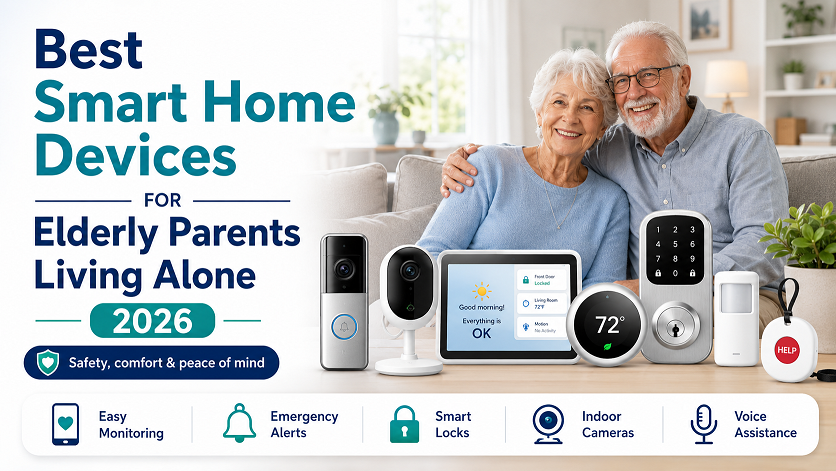
Best Smart Home Devices for Elderly Parents Living Alone 2026
The best smart home devices for elderly parents living alone in 2026, ranked by safety impact: (1) Medical alert system with fall detection — Bay Alarm Medical or Medical Guardian from $27.95/month; (2) Motion-activated smart lighting — Philips Hue or Govee motion sensors in hallways and bathrooms; (3) Video doorbell — Ring or Eufy, eliminates the need to rush to the door; (4) Smart smoke and CO detectors — Nest Protect alerts both the senior and family remotely; (5) Medication dispenser — Hero or MedMinder for seniors with complex medication schedules; (6) Smart plug for activity monitoring — tracks whether the coffee maker runs at its normal time without any cameras. The most important rule: choose devices your parent will actually use without your help, not the most sophisticated technology.
The best smart home devices for elderly parents living alone are not the ones with the most features — they are the ones your parent will actually use without your help, that increase safety without making them feel watched, and that work reliably without requiring a technology degree to set up. According to a 2024 AARP report, 75% of Americans aged 50 and older plan to age in place — staying in their own homes rather than moving to assisted living. Smart home technology makes that possible for longer. The right devices, chosen well, become invisible guardians.
This guide ranks every meaningful smart home device for elderly parents living alone by the order you should actually implement them — not alphabetically, not by price, but by which device saves the most lives and prevents the most injuries first. With more than 38,000 fall-related deaths among adults 65+ in 2021 alone (CDC), and 1 in 4 seniors falling each year, the stakes are real and the device priority order matters.
Where to Start: The Hierarchy of Smart Home Safety for Elderly Parents Living Alone
Most guides list smart home devices for elderly parents alphabetically or by category — cameras, lights, sensors. The problem is that approach treats a $12 motion-activated night light and a $30/month medical alert system as equivalent choices. They are not. This guide prioritizes by safety impact first, then by ease of adoption, then by cost.
| Priority | Device Type | Primary Risk It Addresses | Typical Cost |
|---|---|---|---|
| 1 — Critical | Medical alert system with fall detection | Fall-related death or prolonged injury from undetected fall | $25–$45/month |
| 2 — High | Motion-activated smart lighting | Nighttime fall from searching for light switches in the dark | $15–$50 per light |
| 3 — High | Video doorbell | Fall rushing to the door; scam vulnerability; isolation | $80–$250 one-time |
| 4 — High | Smart smoke / CO detector | Fire or CO poisoning with no family notification capability | $100–$130/unit |
| 5 — Medium-High | Medication dispenser | Missed doses, double doses, wrong medication | $30–$60/month |
| 6 — Medium | Smart plug (activity monitoring) | Undetected change in daily routine signaling a problem | $10–$20 each |
| 7 — Medium | Door/window sensors | Wandering (dementia), unexpected absence, unusual activity times | $10–$35 per sensor |
| 8 — Medium | Stove shut-off device | Kitchen fire from unattended cooking — leading home fire cause | $100–$200 |
Priority 1: Medical Alert System with Fall Detection
A medical alert pendant with professional monitoring and fall detection is the single most impactful device for any elderly parent living alone. A fall that goes undetected for hours leads to dramatically worse outcomes than one where help arrives in minutes. Fall detection automatically calls for help even if the senior cannot press the button.
Best picks in 2026: Bay Alarm Medical ($27.95/month, PC Magazine Editors’ Choice, 8-second average response time); Medical Guardian ($29.99/month, Alexa and Google Home compatible, smartwatch option); MobileHelp ($24.95/month, best value, no contracts).
Priority 2: Smart Lighting with Motion Sensors
The CDC identifies inadequate lighting as a major fall risk factor in senior households. Searching for a light switch in the dark — especially during a 3am bathroom trip — is exactly the kind of routine moment that causes serious falls. Motion-activated lights that turn on automatically eliminate this entirely, with zero behavior change required from your parent.
Where to install: Bedroom-to-hallway path, hallway-to-bathroom path, bathroom (especially near the toilet and shower), stairways (top and bottom), and kitchen. Even plug-in night lights with motion sensors (LOHAS, GE Cync, DEWENWILS) work in outlet-tight spaces and cost under $15 each.
Best products: Philips Hue motion sensor + compatible bulbs ($25–$40 per light, integrates with smart home systems); Govee Smart Motion Sensor Light Strip (easy self-adhesive installation, $20–$30); AUVON Motion Sensor Night Light (~$15, plug-in, no setup required).
Priority 3: Video Doorbell
A video doorbell is one of the devices seniors are most likely to actually love — because the benefit is immediately obvious to them personally. They can see who is at the door and speak to them from wherever they are in the house, without getting up. For seniors with limited mobility, this is a significant daily convenience. For families, it provides a two-way check-in tool that doesn’t feel intrusive.
Safety benefits beyond convenience: Seniors no longer need to rush to the door (a common fall trigger). The doorbell camera records visitors, deterring scammers who frequently target elderly adults. Family members can check in visually through the app. If the senior answers the door and something seems wrong, family members can intervene remotely.
Best products: Ring Video Doorbell (Wired, ~$100) — most widely supported, integrates with Alexa, family drop-in through Ring app; Eufy Video Doorbell E340 (~$150) — local storage, no subscription required; Google Nest Doorbell (~$180) — best if parent uses Google Home or Nest Hub display.
Priority 4: Smart Smoke and CO Detectors
Traditional smoke detectors are loud — but they only alert people who are present in the home. If a fire starts at 2am while an elderly parent is sleeping deeply, or while they are in a part of the house where the alarm is less audible, the alert may not wake them in time. Smart smoke detectors send push notifications to family members’ phones when an alarm triggers, enabling a faster response from outside the home.
Best products: Google Nest Protect (~$119) — the gold standard, detects both smoke and CO, sends phone alerts to family, announces spoken warnings (“There is smoke in the hallway”), allows false alarm shutoff from the phone (no need to wave a towel at the ceiling); X-Sense SC06-WX (~$35/unit, more affordable, also sends app alerts).
Priority 5: Smart Medication Dispenser
Medication errors — missed doses, double doses, wrong medication — are one of the leading causes of hospitalization among seniors. Automatic medication dispensers lock individual doses until the correct time, dispense them with a visual or audible alert, and notify family members if a dose is missed. For seniors managing five or more daily medications, these devices can be life-changing.
Best products: Hero ($44.99/month subscription, holds 10 medication types, app alerts for missed doses, connects to family caregiver accounts); MedMinder ($40/month, pill dispenser with wireless connectivity, calls the senior and alerts family if a dose is missed); Livi ($34.95/month, cellular-connected, family app, 4-week pill capacity).
Priority 6: Smart Plugs for Non-Invasive Activity Monitoring
A smart plug connected to a coffee maker, lamp, or television provides meaningful daily activity awareness without any camera. If your parent always makes coffee at 7am and the app shows no activity by 10am, that’s a meaningful signal to call or check in. This approach gives families peace of mind without the privacy concerns that come with cameras inside the home.
Best products: TP-Link Kasa EP25 (~$18, includes energy monitoring for tracking appliance patterns); TP-Link Kasa EP10 Mini (~$10, ultra-compact for tight outlet spaces); Amazon Smart Plug (~$15, easy Alexa voice control for the senior).
Priority 7: Door and Window Sensors
Door and window sensors notify family members when exterior doors open or close. For seniors with dementia or wandering risk, this is critical — a front door opening at 2am is a serious alert. For all seniors, a sensor on the front door that logs when they leave and return gives family members meaningful daily routine insight without cameras.
Best products: Aqara Door and Window Sensor P2 (~$15, Zigbee, works with Alexa, HomeKit, and Google Home, supports up to 128 sensors on one hub); Ring Alarm Contact Sensor (~$20, integrates with Ring ecosystem); Govee Door Sensor (~$10 for 3-pack, no hub required).
Priority 8: Stove Shut-Off and Kitchen Safety Devices
Unattended cooking is the leading cause of home fires in the United States, and seniors are disproportionately affected. Stove shut-off devices automatically cut power to the stove if they detect no movement in the kitchen for a set period while the stove is on, or if they detect smoke or flame. These devices work without any action from the senior and don’t change their cooking routine.
Best products: Stove Guard Smart Stove Guard (~$200, mounts to the wall above the stove, detects motion and flames, shuts off stove automatically, sends family notifications); iGuardStove (~$150, auto shutoff when no motion detected, timer-based); Flo by Moen water sensor also detects cooking-related water leaks from kitchen incidents.
Special Section: Smart Home Setup for Seniors with Dementia
Seniors with dementia require a different device priority order because the risks and behavioral patterns are meaningfully different from cognitively intact seniors living alone.
🔵 Dementia-Specific Priority Devices
- Door and window sensors with wandering alerts — Priority 1 for dementia; exterior door opening at unusual hours is the most critical alert for wandering risk
- Smart stove shut-off device — Priority 2; dementia significantly increases unattended cooking incidents
- Motion-activated lighting — Same priority as general seniors, but especially important as sleep patterns change with dementia
- Smart speaker for routine reminders — A pre-programmed Echo Dot can announce medication time, meals, and appointment reminders at set times without requiring the senior to initiate anything
- Smart lock with keypad — Schlage Encode or Yale Assure; prevents wandering while allowing family and caregiver access with codes; pair with a door sensor for the combination of alert + prevention
- Radar-based fall detection (SafelyYou, CarePredict) — Wall-mounted sensors detect falls without cameras, important for seniors who won’t reliably wear a pendant
How to Get Your Parent to Actually Use This Technology
Choosing the right device is only half the challenge. Getting an elderly parent to use it without resistance is the other half — and it’s often harder than the technology itself.
- Never lead with “I’m worried about you” or “safety.” These frames put seniors on the defensive because they imply a loss of independence. Lead with the personal convenience benefit for them instead.
- Frame each device in terms of what it does for them, not for you. “You never have to get up to see who’s at the door” (video doorbell). “The hallway light just turns on automatically” (motion sensor). “You can call me just by saying my name” (smart speaker). These framings all emphasize the senior’s gain, not the family’s peace of mind.
- Start with one device, not six. Introducing multiple new devices at once is overwhelming and leads to rejection of all of them. Pick the highest-priority device your parent is most likely to accept (often the video doorbell, because seniors immediately understand the personal benefit) and get comfortable with that first.
- Install it yourself during a visit. Don’t ship it and ask them to set it up. Go there, set it up, demonstrate it working, and use it with them a few times before you leave.
- Make it as invisible as possible. The best senior smart home devices are the ones that just work in the background. Motion-activated lights, door sensors, and smart plugs all operate without any interaction from your parent. These are easier to adopt because there’s nothing to adopt — they just start working.
Need a Medical Alert System for Your Parent?
Our full comparison covers Bay Alarm Medical, Medical Guardian, MobileHelp, and ADT — with fall detection, Alexa and Google Home compatibility, and month-to-month pricing compared side by side.
Conclusion: The Best Smart Home Devices for Elderly Parents Living Alone
The best smart home devices for elderly parents living alone in 2026 are not the most sophisticated — they are the most reliable, the most invisible, and the most likely to be accepted and used without your ongoing involvement. A medical alert pendant worn every day does more good than a state-of-the-art camera system your parent won’t engage with.
Start with Priority 1: a medical alert system with fall detection. Add motion-activated lighting in the hallways and bathroom. Install a video doorbell. Replace standard smoke detectors with smart ones. Then build out from there based on your parent’s specific situation — whether that’s medication management, wandering risk, or kitchen safety.
Every device on this list is most effective when introduced during a personal visit, framed around your parent’s convenience rather than your worry, and installed so it works invisibly in the background. When smart home devices for elderly parents living alone are chosen well and set up with care, they become exactly what the best technology should be — invisible support that gives seniors more independence, not less.
Frequently Asked Questions
What smart home devices are best for elderly parents living alone?
Ranked by safety impact: (1) Medical alert system with fall detection — Bay Alarm Medical or Medical Guardian from $27.95/month; (2) Motion-activated smart lighting in hallways and bathrooms; (3) Video doorbell — Ring or Eufy, eliminates rushing to the door; (4) Smart smoke and CO detectors — Nest Protect alerts family remotely; (5) Smart medication dispenser — Hero or MedMinder; (6) Smart plug for activity monitoring; (7) Door sensors for routine and wandering detection; (8) Stove shut-off device. The most important rule: prioritize devices your parent will use without your help over devices with the most features.
What is the best way to monitor elderly parents living alone without invading their privacy?
The most privacy-respectful monitoring approaches are: activity inference through smart plugs (tracking whether the coffee maker runs at its usual time without any camera); door and window sensors (family receives an alert if the front door hasn’t opened by a certain time); radar-based fall detection like SafelyYou or CarePredict (detects falls using radar without any camera or image); and medical alert smartwatches with caregiver apps that show activity and location without a camera in the home.
How do I get my elderly parent to use smart home technology?
Never lead with “safety” or “I’m worried” — these frames put seniors on the defensive. Frame each device around its convenience benefit for them: “You never have to get up to answer the door” (video doorbell); “The light turns on automatically so you don’t have to find the switch” (motion sensor). Start with one device, not multiple. Install it yourself during a visit. Choose devices that work invisibly without any action required from your parent — motion lights, door sensors, and smart plugs all start working immediately without any behavior change.
Are smart plugs good for monitoring elderly parents?
Yes — smart plugs are one of the most effective non-invasive monitoring tools for elderly parents. Connecting a coffee maker, lamp, or TV to a smart plug lets family track whether the senior’s normal daily routine is happening without any cameras. If Mom always makes coffee at 7am and the smart plug shows no activity by 10am, that’s a meaningful signal. Smart plugs with energy monitoring (like TP-Link Kasa EP25 at ~$18) can track usage patterns that reveal routine changes. They require no technical knowledge from the senior to use.
What smart home devices help prevent falls in seniors?
The most effective fall-prevention smart home devices are: (1) Motion-activated smart lighting in hallways, bathrooms, and stairways — the CDC cites inadequate lighting as a major fall risk; (2) Medical alert systems with fall detection — Bay Alarm Medical and Medical Guardian both offer automatic fall detection; (3) Radar-based fall sensors like SafelyYou or CarePredict — wall-mounted, no cameras; (4) Video doorbells — reduce falls caused by rushing to the door; (5) Smart stove monitors — prevent kitchen accidents that cause falls responding to a fire.
What is a good smart home setup for a senior with dementia?
For seniors with dementia, prioritize: (1) Door and window sensors with wandering alerts — exterior door opening at unusual hours is the most critical alert; (2) Stove shut-off devices — dementia increases unattended cooking risk significantly; (3) Motion-activated lighting — especially important as sleep patterns change; (4) Smart lock with keypad (Schlage Encode or Yale Assure) — prevents wandering while allowing caregiver access; (5) Smart speaker for routine reminders — pre-programmed to announce medication times and meals without requiring interaction; (6) Radar-based fall detection for seniors who won’t reliably wear a pendant.
Related Guides
- Age Safe America — Smart Home Devices for Senior Independence in 2026 (May 2026)
- ParentCareTech — Essential Technology for Elderly Parents Living Alone: Complete 2026 Guide (March 2026)
- SeniorSite — 15 Best Elderly Monitoring Devices for Peace of Mind in 2026 (June 2026)
- AARP — 2024 Home and Community Preferences Survey
- CDC — Fall Deaths Among Adults 65 and Older
- CDC — Falls Prevention for Older Adults
- AR Home Care — 7 Simple Smart Home Devices Elderly Parents Actually Love to Use (March 2025)